
Delete Account
This page explains how to delete your Papumba account and what happens to your data when you do. Papumba is owned and operated by Papumba L.L.C.
If you have any questions, contact us at hello@papumba.com
How to delete your account
You can delete your Papumba account in two ways.
Option 1: Delete your account from within the app (recommended)
1. Launch the Papumba app on your device.
2. Open the side bar and tap the Parents Area button at the bottom of the screen.
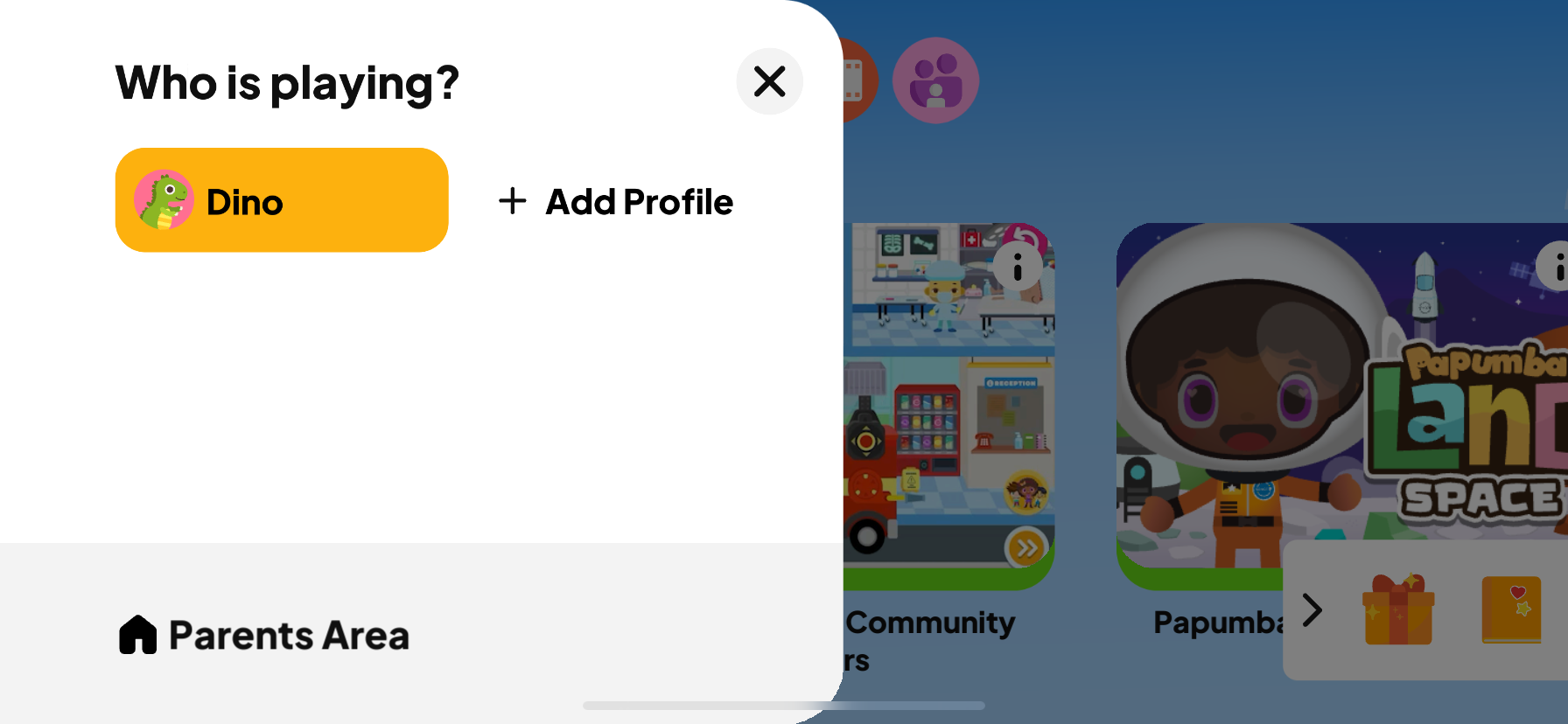
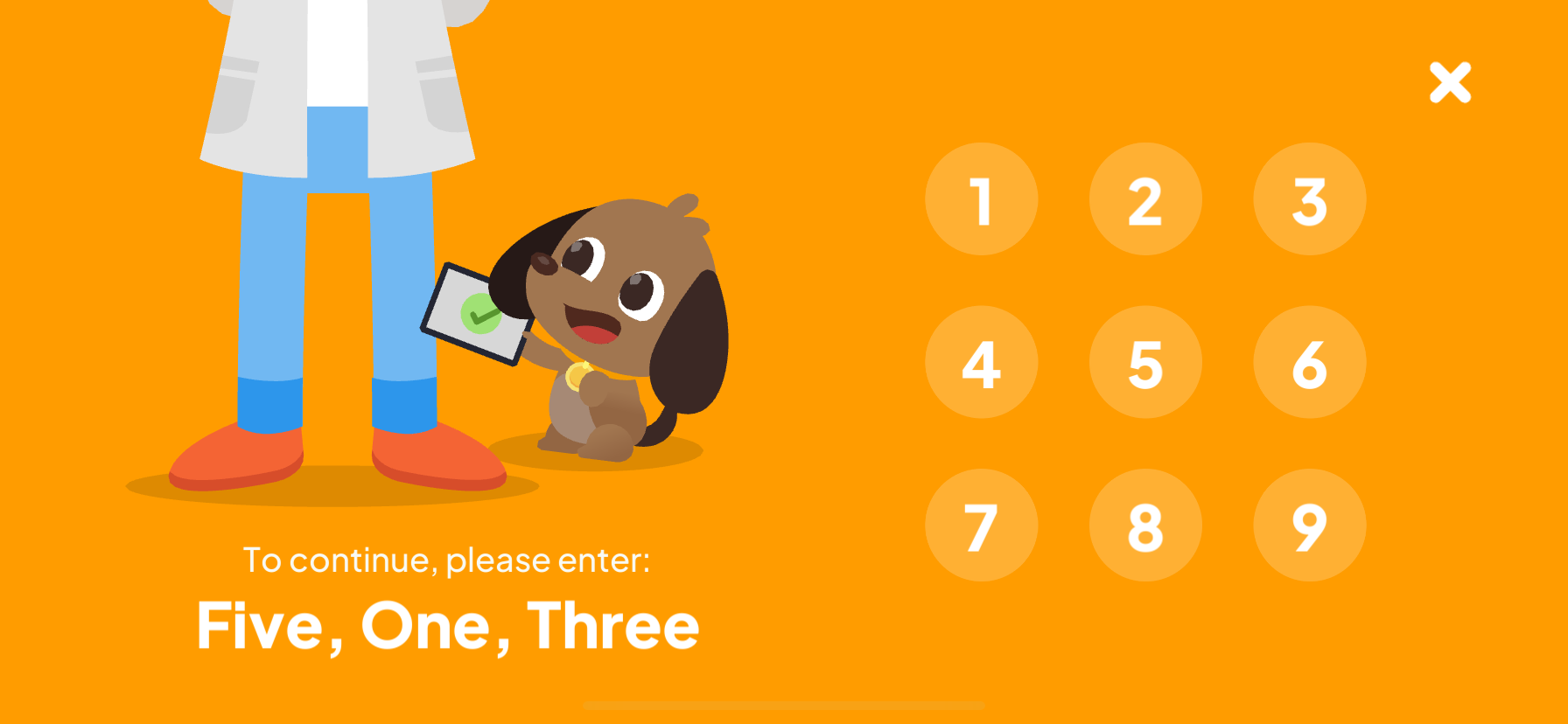
3. Complete the Parental Gate screen.
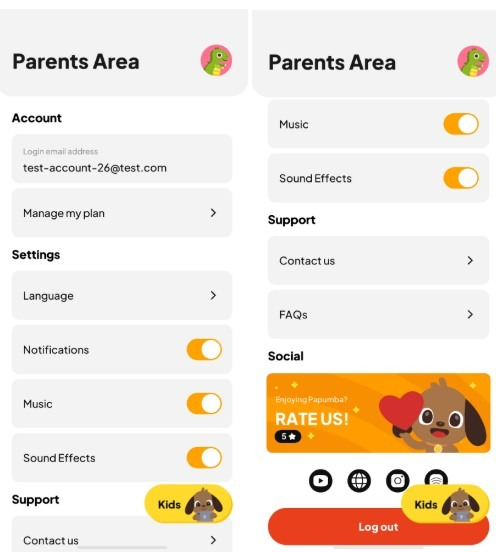
4. Confirm you are signed in with the account you wish to delete. Scroll to Support > FAQs and open the section.
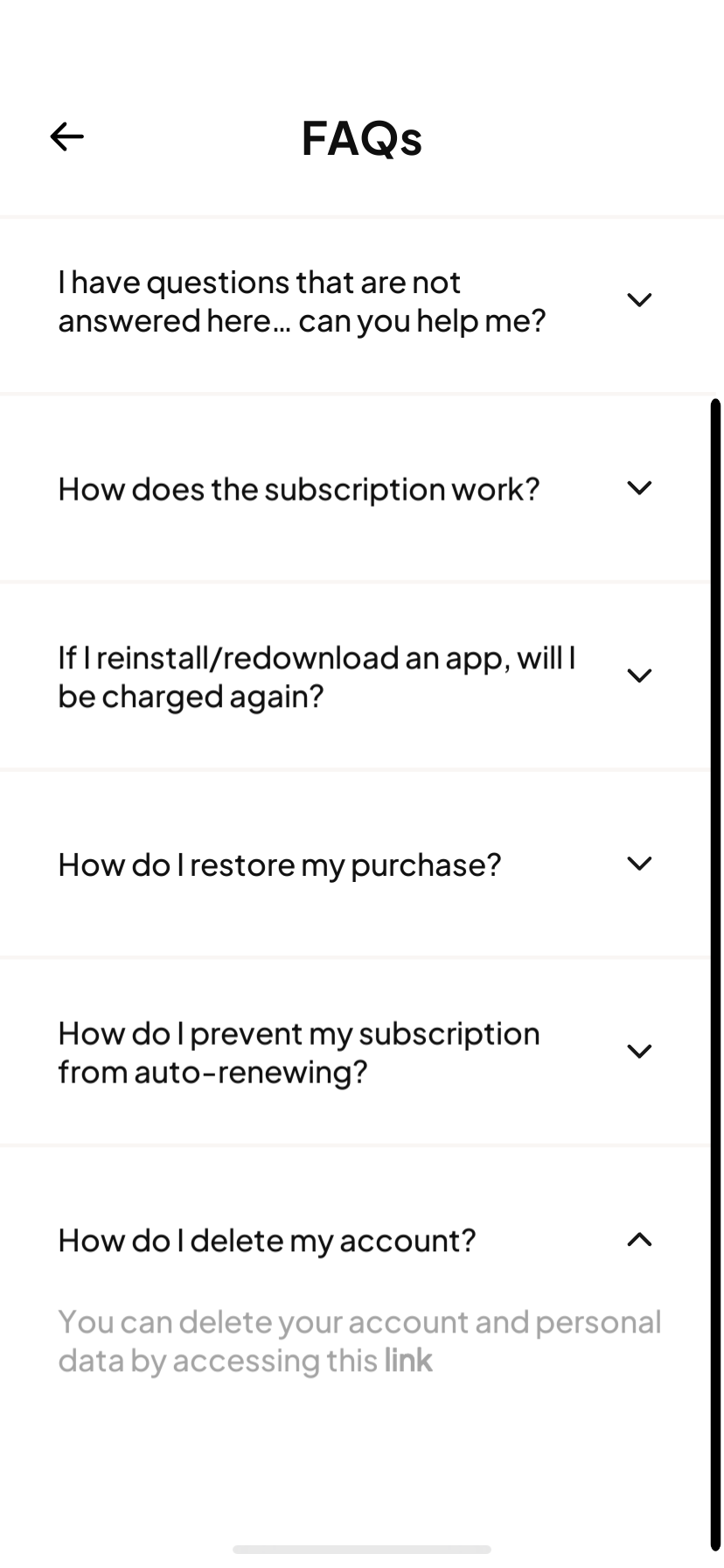
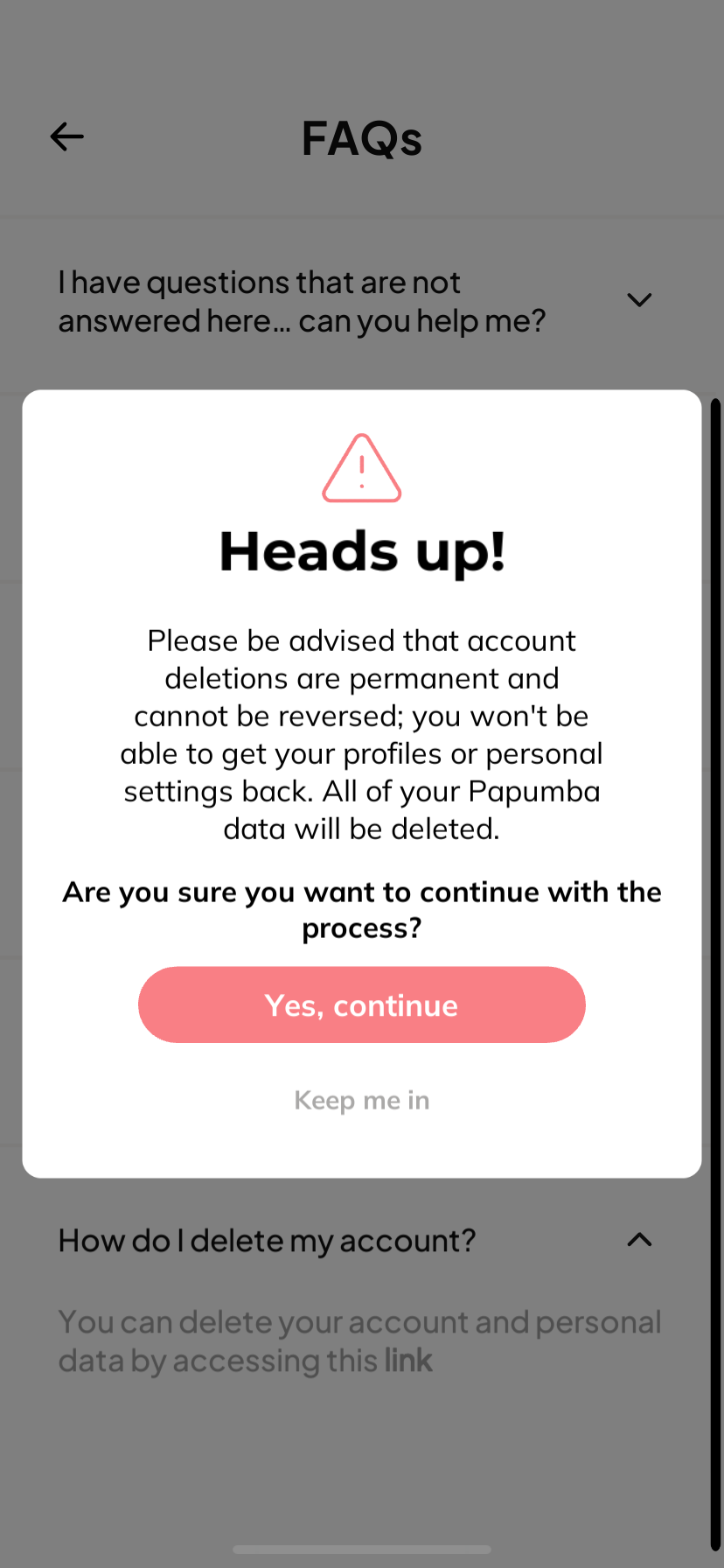
5. Open the "How do I delete my account?" toggle and tap the link inside it.
6. Tap Yes, confirm in the confirmation dialog.
7. Type DELETE and tap Delete account.
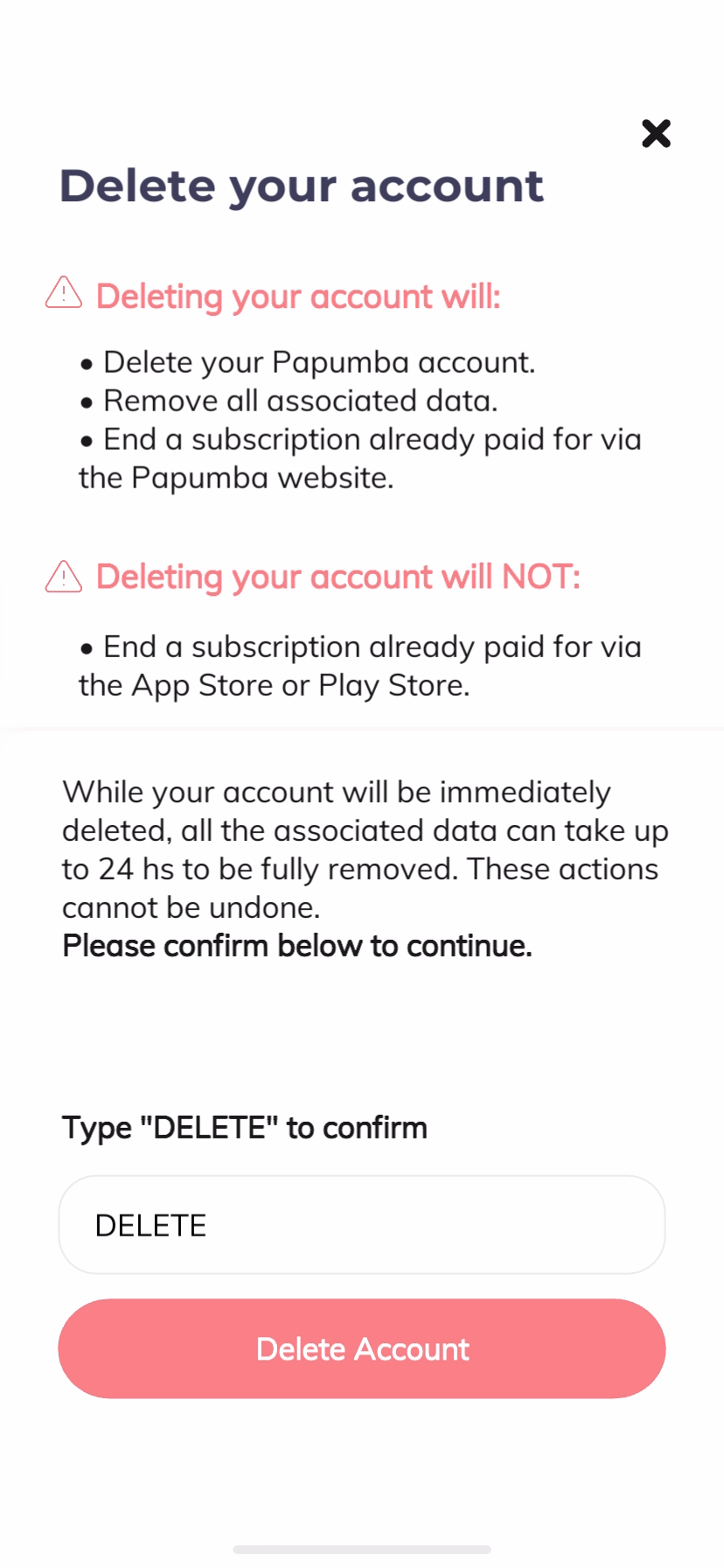
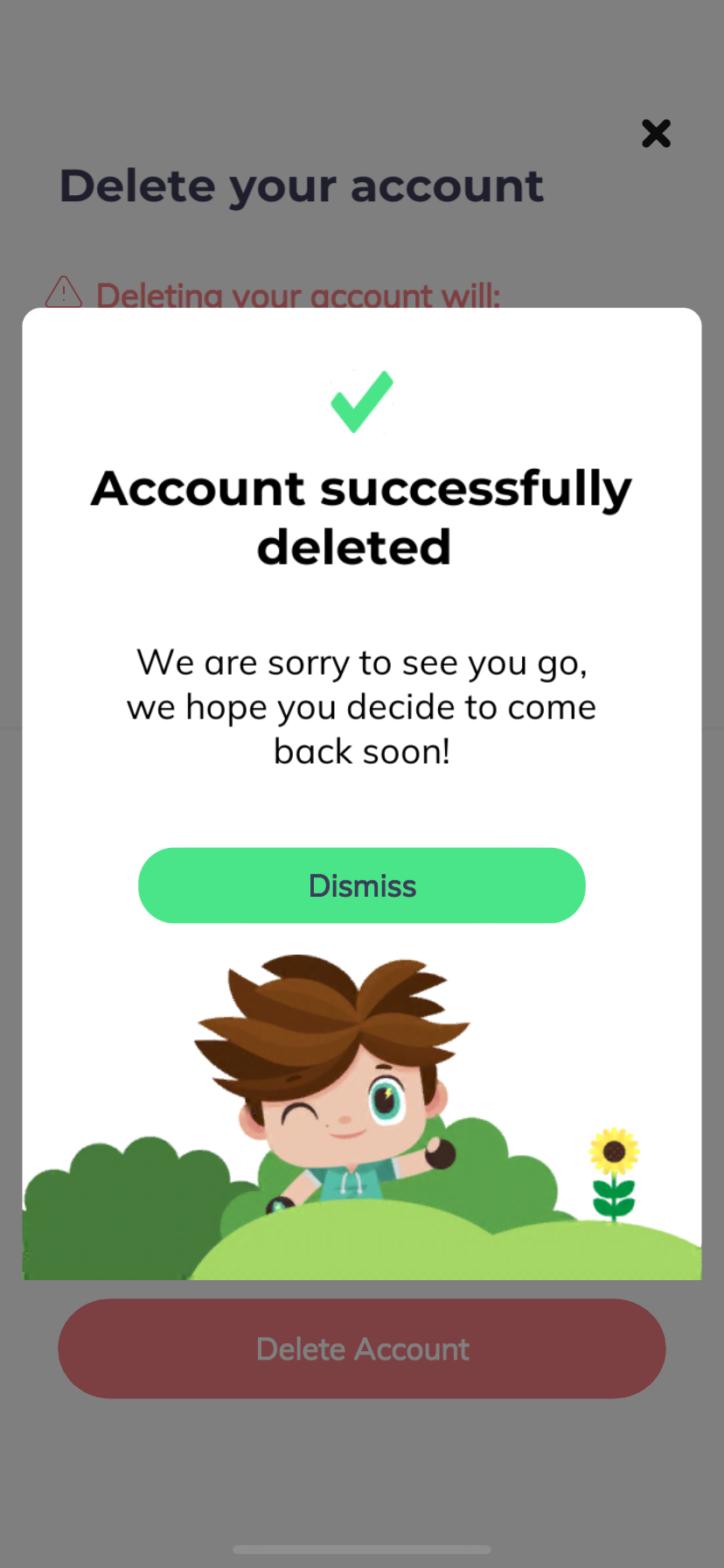
8. Your account will be deleted immediately once you complete these steps. Associated data may take up to 24 hours to be fully removed.
Option 2: Request account deletion by email
If you cannot access the in-app flow, or you would prefer that we process the deletion for you, email us at hello@papumba.com from the email address associated with your Papumba account. Please include the following:
- Subject line: Delete my Papumba account
- In the email: your registered email address and a short confirmation that you want your account deleted.
We will process your request within 7 business days and send you a confirmation email once the deletion is complete.
What happens to your data when you delete your account
Data that is deleted
When you delete your Papumba account, the following data associated with your account is permanently deleted:
- Your name, nickname, or alias
- Your email address
- Your account password
- Any child profile information you added (first name, date of birth, interests)
- Your child's in-app progress, game history, and preferred settings
- Any preferences or interests you saved
- Support conversations and product feedback you submitted
Data that is retained
Some data is retained after account deletion when required by law or for legitimate business purposes:
- Billing and payment records are held by our payment processor (Stripe) in accordance with its own retention policies, typically for a period of 5 to 7 years after the transaction, in order to comply with anti-money laundering, tax, accounting, and other legal obligations.
- Anonymized analytics data (such as aggregated usage statistics that cannot be linked back to you) may be retained indefinitely to help us improve our apps.
- Backup copies of our systems may contain your personal data for up to 60 days after deletion. This data is not actively used and is permanently removed when the backup cycle completes.
Active subscriptions
Deleting your Papumba account does not automatically cancel an active paid subscription if it was purchased through the Apple App Store or Google Play Store. To cancel your subscription, please follow the instructions for your store:
- Google Play: https://support.google.com/googleplay/answer/7018481
- Apple App Store: https://support.apple.com/en-us/HT202039
If your subscription was purchased directly through our website, it will be canceled as part of the account deletion process.
Questions?
For any questions about account deletion or how we handle your data, please contact us at hello@papumba.com or read our full Privacy Policy.
This page explains how to delete your Papumba account and what happens to your data when you do. Papumba is owned and operated by Papumba L.L.C.
If you have any questions, contact us at hello@papumba.com
How to delete your account
You can delete your Papumba account in two ways.
Option 1: Delete your account from within the app (recommended)
1. Launch the Papumba app on your device.
2. Open the side bar and tap the Parents Area button at the bottom of the screen.
3. Complete the Parental Gate screen.
4. Confirm you are signed in with the account you wish to delete. Scroll to Support > FAQs and open the section.
5. Open the "How do I delete my account?" toggle and tap the link inside it.
6. Tap Yes, confirm in the confirmation dialog.
7. Type DELETE and tap Delete account.
8. Your account will be deleted immediately once you complete these steps. Associated data may take up to 24 hours to be fully removed.
Option 2: Request account deletion by email
If you cannot access the in-app flow, or you would prefer that we process the deletion for you, email us at hello@papumba.com from the email address associated with your Papumba account. Please include the following:
- Subject line: Delete my Papumba account
- In the email: your registered email address and a short confirmation that you want your account deleted.
We will process your request within 7 business days and send you a confirmation email once the deletion is complete.
What happens to your data when you delete your account
Data that is deleted
When you delete your Papumba account, the following data associated with your account is permanently deleted:
- Your name, nickname, or alias
- Your email address
- Your account password
- Any child profile information you added (first name, date of birth, interests)
- Your child's in-app progress, game history, and preferred settings
- Any preferences or interests you saved
- Support conversations and product feedback you submitted
Data that is retained
Some data is retained after account deletion when required by law or for legitimate business purposes:
- Billing and payment records are held by our payment processor (Stripe) in accordance with its own retention policies, typically for a period of 5 to 7 years after the transaction, in order to comply with anti-money laundering, tax, accounting, and other legal obligations.
- Anonymized analytics data (such as aggregated usage statistics that cannot be linked back to you) may be retained indefinitely to help us improve our apps.
- Backup copies of our systems may contain your personal data for up to 60 days after deletion. This data is not actively used and is permanently removed when the backup cycle completes.
Active subscriptions
Deleting your Papumba account does not automatically cancel an active paid subscription if it was purchased through the Apple App Store or Google Play Store. To cancel your subscription, please follow the instructions for your store:
- Google Play: https://support.google.com/googleplay/answer/7018481
- Apple App Store: https://support.apple.com/en-us/HT202039
If your subscription was purchased directly through our website, it will be canceled as part of the account deletion process.
Questions?
For any questions about account deletion or how we handle your data, please contact us at hello@papumba.com or read our full Privacy Policy.
This page explains how to delete your Papumba account and what happens to your data when you do. Papumba is owned and operated by Papumba L.L.C.
If you have any questions, contact us at hello@papumba.com
How to delete your account
You can delete your Papumba account in two ways.
Option 1: Delete your account from within the app (recommended)
1. Launch the Papumba app on your device.
2. Open the side bar and tap the Parents Area button at the bottom of the screen.
3. Complete the Parental Gate screen.
4. Confirm you are signed in with the account you wish to delete. Scroll to Support > FAQs and open the section.
5. Open the "How do I delete my account?" toggle and tap the link inside it.
6. Tap Yes, confirm in the confirmation dialog.
7. Type DELETE and tap Delete account.
8. Your account will be deleted immediately once you complete these steps. Associated data may take up to 24 hours to be fully removed.
Option 2: Request account deletion by email
If you cannot access the in-app flow, or you would prefer that we process the deletion for you, email us at hello@papumba.com from the email address associated with your Papumba account. Please include the following:
- Subject line: Delete my Papumba account
- In the email: your registered email address and a short confirmation that you want your account deleted.
We will process your request within 7 business days and send you a confirmation email once the deletion is complete.
What happens to your data when you delete your account
Data that is deleted
When you delete your Papumba account, the following data associated with your account is permanently deleted:
- Your name, nickname, or alias
- Your email address
- Your account password
- Any child profile information you added (first name, date of birth, interests)
- Your child's in-app progress, game history, and preferred settings
- Any preferences or interests you saved
- Support conversations and product feedback you submitted
Data that is retained
Some data is retained after account deletion when required by law or for legitimate business purposes:
- Billing and payment records are held by our payment processor (Stripe) in accordance with its own retention policies, typically for a period of 5 to 7 years after the transaction, in order to comply with anti-money laundering, tax, accounting, and other legal obligations.
- Anonymized analytics data (such as aggregated usage statistics that cannot be linked back to you) may be retained indefinitely to help us improve our apps.
- Backup copies of our systems may contain your personal data for up to 60 days after deletion. This data is not actively used and is permanently removed when the backup cycle completes.
Active subscriptions
Deleting your Papumba account does not automatically cancel an active paid subscription if it was purchased through the Apple App Store or Google Play Store. To cancel your subscription, please follow the instructions for your store:
- Google Play: https://support.google.com/googleplay/answer/7018481
- Apple App Store: https://support.apple.com/en-us/HT202039
If your subscription was purchased directly through our website, it will be canceled as part of the account deletion process.
Questions?
For any questions about account deletion or how we handle your data, please contact us at hello@papumba.com or read our full Privacy Policy.
This page explains how to delete your Papumba account and what happens to your data when you do. Papumba is owned and operated by Papumba L.L.C.
If you have any questions, contact us at hello@papumba.com
How to delete your account
You can delete your Papumba account in two ways.
Option 1: Delete your account from within the app (recommended)
1. Launch the Papumba app on your device.
2. Open the side bar and tap the Parents Area button at the bottom of the screen.
3. Complete the Parental Gate screen.
4. Confirm you are signed in with the account you wish to delete. Scroll to Support > FAQs and open the section.
5. Open the "How do I delete my account?" toggle and tap the link inside it.
6. Tap Yes, confirm in the confirmation dialog.
7. Type DELETE and tap Delete account.
8. Your account will be deleted immediately once you complete these steps. Associated data may take up to 24 hours to be fully removed.
Option 2: Request account deletion by email
If you cannot access the in-app flow, or you would prefer that we process the deletion for you, email us at hello@papumba.com from the email address associated with your Papumba account. Please include the following:
- Subject line: Delete my Papumba account
- In the email: your registered email address and a short confirmation that you want your account deleted.
We will process your request within 7 business days and send you a confirmation email once the deletion is complete.
What happens to your data when you delete your account
Data that is deleted
When you delete your Papumba account, the following data associated with your account is permanently deleted:
- Your name, nickname, or alias
- Your email address
- Your account password
- Any child profile information you added (first name, date of birth, interests)
- Your child's in-app progress, game history, and preferred settings
- Any preferences or interests you saved
- Support conversations and product feedback you submitted
Data that is retained
Some data is retained after account deletion when required by law or for legitimate business purposes:
- Billing and payment records are held by our payment processor (Stripe) in accordance with its own retention policies, typically for a period of 5 to 7 years after the transaction, in order to comply with anti-money laundering, tax, accounting, and other legal obligations.
- Anonymized analytics data (such as aggregated usage statistics that cannot be linked back to you) may be retained indefinitely to help us improve our apps.
- Backup copies of our systems may contain your personal data for up to 60 days after deletion. This data is not actively used and is permanently removed when the backup cycle completes.
Active subscriptions
Deleting your Papumba account does not automatically cancel an active paid subscription if it was purchased through the Apple App Store or Google Play Store. To cancel your subscription, please follow the instructions for your store:
- Google Play: https://support.google.com/googleplay/answer/7018481
- Apple App Store: https://support.apple.com/en-us/HT202039
If your subscription was purchased directly through our website, it will be canceled as part of the account deletion process.
Questions?
For any questions about account deletion or how we handle your data, please contact us at hello@papumba.com or read our full Privacy Policy.
This page explains how to delete your Papumba account and what happens to your data when you do. Papumba is owned and operated by Papumba L.L.C.
If you have any questions, contact us at hello@papumba.com
How to delete your account
You can delete your Papumba account in two ways.
Option 1: Delete your account from within the app (recommended)
1. Launch the Papumba app on your device.
2. Open the side bar and tap the Parents Area button at the bottom of the screen.
3. Complete the Parental Gate screen.
4. Confirm you are signed in with the account you wish to delete. Scroll to Support > FAQs and open the section.
5. Open the "How do I delete my account?" toggle and tap the link inside it.
6. Tap Yes, confirm in the confirmation dialog.
7. Type DELETE and tap Delete account.
8. Your account will be deleted immediately once you complete these steps. Associated data may take up to 24 hours to be fully removed.
Option 2: Request account deletion by email
If you cannot access the in-app flow, or you would prefer that we process the deletion for you, email us at hello@papumba.com from the email address associated with your Papumba account. Please include the following:
- Subject line: Delete my Papumba account
- In the email: your registered email address and a short confirmation that you want your account deleted.
We will process your request within 7 business days and send you a confirmation email once the deletion is complete.
What happens to your data when you delete your account
Data that is deleted
When you delete your Papumba account, the following data associated with your account is permanently deleted:
- Your name, nickname, or alias
- Your email address
- Your account password
- Any child profile information you added (first name, date of birth, interests)
- Your child's in-app progress, game history, and preferred settings
- Any preferences or interests you saved
- Support conversations and product feedback you submitted
Data that is retained
Some data is retained after account deletion when required by law or for legitimate business purposes:
- Billing and payment records are held by our payment processor (Stripe) in accordance with its own retention policies, typically for a period of 5 to 7 years after the transaction, in order to comply with anti-money laundering, tax, accounting, and other legal obligations.
- Anonymized analytics data (such as aggregated usage statistics that cannot be linked back to you) may be retained indefinitely to help us improve our apps.
- Backup copies of our systems may contain your personal data for up to 60 days after deletion. This data is not actively used and is permanently removed when the backup cycle completes.
Active subscriptions
Deleting your Papumba account does not automatically cancel an active paid subscription if it was purchased through the Apple App Store or Google Play Store. To cancel your subscription, please follow the instructions for your store:
- Google Play: https://support.google.com/googleplay/answer/7018481
- Apple App Store: https://support.apple.com/en-us/HT202039
If your subscription was purchased directly through our website, it will be canceled as part of the account deletion process.
Questions?
For any questions about account deletion or how we handle your data, please contact us at hello@papumba.com or read our full Privacy Policy.
This page explains how to delete your Papumba account and what happens to your data when you do. Papumba is owned and operated by Papumba L.L.C.
If you have any questions, contact us at hello@papumba.com
How to delete your account
You can delete your Papumba account in two ways.
Option 1: Delete your account from within the app (recommended)
1. Launch the Papumba app on your device.
2. Open the side bar and tap the Parents Area button at the bottom of the screen.
3. Complete the Parental Gate screen.
4. Confirm you are signed in with the account you wish to delete. Scroll to Support > FAQs and open the section.
5. Open the "How do I delete my account?" toggle and tap the link inside it.
6. Tap Yes, confirm in the confirmation dialog.
7. Type DELETE and tap Delete account.
8. Your account will be deleted immediately once you complete these steps. Associated data may take up to 24 hours to be fully removed.
Option 2: Request account deletion by email
If you cannot access the in-app flow, or you would prefer that we process the deletion for you, email us at hello@papumba.com from the email address associated with your Papumba account. Please include the following:
- Subject line: Delete my Papumba account
- In the email: your registered email address and a short confirmation that you want your account deleted.
We will process your request within 7 business days and send you a confirmation email once the deletion is complete.
What happens to your data when you delete your account
Data that is deleted
When you delete your Papumba account, the following data associated with your account is permanently deleted:
- Your name, nickname, or alias
- Your email address
- Your account password
- Any child profile information you added (first name, date of birth, interests)
- Your child's in-app progress, game history, and preferred settings
- Any preferences or interests you saved
- Support conversations and product feedback you submitted
Data that is retained
Some data is retained after account deletion when required by law or for legitimate business purposes:
- Billing and payment records are held by our payment processor (Stripe) in accordance with its own retention policies, typically for a period of 5 to 7 years after the transaction, in order to comply with anti-money laundering, tax, accounting, and other legal obligations.
- Anonymized analytics data (such as aggregated usage statistics that cannot be linked back to you) may be retained indefinitely to help us improve our apps.
- Backup copies of our systems may contain your personal data for up to 60 days after deletion. This data is not actively used and is permanently removed when the backup cycle completes.
Active subscriptions
Deleting your Papumba account does not automatically cancel an active paid subscription if it was purchased through the Apple App Store or Google Play Store. To cancel your subscription, please follow the instructions for your store:
- Google Play: https://support.google.com/googleplay/answer/7018481
- Apple App Store: https://support.apple.com/en-us/HT202039
If your subscription was purchased directly through our website, it will be canceled as part of the account deletion process.
Questions?
For any questions about account deletion or how we handle your data, please contact us at hello@papumba.com or read our full Privacy Policy.
